building my homelab
A quick overview of how I built a homelab from old hardware and why it’s a great learning project.
Published 15th Nov, 2025
For well over the past decade, I’ve been into computers. Starting off with a very basic build that I got from my cousin, playing GTA Vice-City and running my first HTML-only page (wish I had an actual backup), I moved on to a better build and began working on actual projects that mattered. Up until recently is when I started getting my hands dirty with real hardware. Swapping hard drives, trading computer hardware on Reddit, and whatnot.
What’s a homelab though?
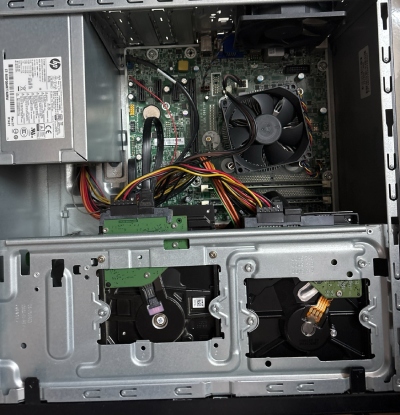
My current homelab, an HP ProDesk 400 G2 MT.
I’ll get into the actual hardware specs later, but think of a homelab as a safe haven where you can break and test anything within the privacy of your local network (as long as you don’t expose anything to the internet, that is).
It’s essentially a lab just like those “computer labs”, but here you’re in control to perform experiments of your own. If I had to explain it to a 5-year-old, I’d just rip apart an RC car and fix it back. That’s what it is!
Why did I start here?
Ummm, I found it interesting, that’s the only sensible answer I have. But little did I know this was going to send me down a rabbit hole. I spend most of my time fixing it rather than actually using it, like a secret kink of mine. I love experiments, I’m someone who would absolutely tear down a product. If you ask me to review “X”, I’d review both “X”, “Y”, and also “Z” at times just to push something to its limits.
I absolutely love spending time on this because it gives me the freedom to self-host multiple OSS tools and also because of the learning curve. Oh, I’ve learned a lot about hardware in general while fixing stuff, more than I ever did in college.
This initially started off with a lot of research on Reddit, multiple blogs, and so on. I would see people post their enterprise grade hardware and wonder if all of that was worth the risk. The answer? Yes, it was, but with a sensible mind. For someone like an absolute beginner, you don’t really need a 2U or 4U server with all those fans going grrrr 24/7. All you need is an “old laptop”. Yes, just a laptop, and voila, you have the hardware required to set up a small lab from scratch.
If you’re a techie, you would have absolutely heard of the infamous DNS registrar “Freenom” and the hosting provider “Hostinger”. Like anyone else, I had a free domain with the “.ga” TLD back on Freenom, and the website files lived over at Hostinger classic free hosting without worrying about anything. Soon Freenom started having problems of its own until it was shut down, but I still relied on the free TLDs they offered.
I then moved over to GitHub, which very generously provides something called “GitHub Pages”, a feature to host static websites with a custom domain or a “github.io” subdomain. It was all fine until you moved to hosting actual dynamic content. That’s where the first HTML page was born again from scratch on my homelab, running Ubuntu 20.04 and Apache.
Lookout for the actual hardware
I did not have a laptop or a spare computer that I could recycle to build this box, and for someone just getting started, it didn’t make sense to spend ₹₹ right away. Reddit was one such place where I could find like-minded people selling hardware for a cheaper price, but this came with a lot of additional shipping charges and stuff.
I reached out to people I knew and was able to get the tower PC pictured above for close to ₹2500, with a TFT LED monitor included. It was indeed a very good deal. This computer was not often used and would just stay there turned off most of the time. I was able to get my hands on it through an auction, and luckily for me, it was and still is in very good shape.
The hardware is old-school like 2013ish, but runs smoothly like it was released yesterday, thanks to the Linux kernel, of course, that doesn’t come loaded with any jargon that nicks the resources. This is what an “HP ProDesk 400 G2 MT” gives you with a little upgrade in terms of memory.
~ # inxi -F                                                                                                                                          root@draco
System:
  Host: draco Kernel: 6.8.0-87-generic arch: x86_64 bits: 64
  Console: pty pts/0 Distro: Ubuntu 24.04.3 LTS (Noble Numbat)
CPU:
  Info: dual core model: Intel Core i3-4130 bits: 64 type: MT MCP cache: L2: 512 KiB
  ...
Network:
  Device-1: Realtek RTL8111/8168/8211/8411 PCI Express Gigabit Ethernet driver: r8169
  ...
Info:
  Memory: total: 16 GiB
  ...
In terms of disks, the total storage pool is about 2.7 TiB (internal + external), partitioned as per my needs following a tweaked-down version of the standard 3-2-1 backup strategy. Honestly, at the moment I don’t really need a bloated amount of storage. I do have plans to set up a NAS in the near future when my storage needs grow and data becomes gold.
Why didn’t I virtualize?
Well, most homelabbers out there would prefer Proxmox, an excellent choice for virtualization, but honestly, for an absolute beginner, it can be a lot to navigate through. At present, all my homelab does is run a bundle of containers, close to ~44 serving different purposes including PiHole, OwnCloud, and this very website.
I don’t really need to host additional VMs because I can dual-boot anytime (on my personal computer) and switch between distributions. I don’t find the need to do it right away because most of the utilities and tools are covered by my primary distro, Linux Mint🐧. Again, getting into homelab is exploring a rabbit hole, so time will give me the answers for all the questions, and I might find myself managing a whole Proxmox cluster!
Where are the cables?
They’re not there. It’s a simple tower PC with a single CAT5e LAN cable connected to my ISP’s router. I don’t have a full-blown network setup with switches, patch panels, and LAN outlets in every corner of my room. A couple of reasons for that:
- this is a small yet evolving homelab,
- I don’t have many devices connected, and most of them are just smartphones,
- I can’t drill random holes in the wall because I don’t have permission to do so.
But this doesn’t end there. Since this is a rabbit hole, I do have a complete network architecture in my head, managing a switch, router, and a firewall, probably something running OPNsense.
Would I recommend having a homelab?
Absolutely YES. If you’re someone who’s into tech and you bump into me asking questions about homelabs, I’ll make sure I bombard you with tons of advantages and the actual why’s of having one!
Plan to start small with a broken laptop that still “works”, with the mindset of actually learning and not just trying to look cool out there. Avoid spending thousands on enterprise grade hardware, you don’t need that when you’re getting started. The plan is to learn and then expand, not expand and be lost without knowing what to do next.
There’s a whole community on Reddit with fellow homelabbers to guide you if you ever feel stuck. Share your lab with friends and family. Start your own cloud, host your own services, do whatever. The sky is the limit, just don’t make the dumb mistake of exposing everything to the internet!
I hope this article provided you with enough insights about what a homelab is and why you should start one. Feel free to write to me, I’d love to see your homelab take shape!
Comments
You can write to me at [email protected]. Email services are insecure, consider encrypting emails with my PGP Key if you're sending me something sensitive.
Loading comments