What's it like being a container? Part 1
A deep, kernel-level explanation of how Docker containers work on Linux.
Published 8th Feb, 2026
Well I’m back after a while and this time I decided to write about something that I’ve been lately exploring a little in depth. Most docker content explains what containers are, but I plan on explaning as to why and how a container actually decides to work because docker is not the only thing doing the work, it’s the Linux kernel as well.
This post kinda dissects containers by walking through the mechanisms that are involved, with every section being a deep dive. However, I’m not a professional on exploring Linux Kernel internals because I suck at C.
How is a container born?
If you’ve ever worked with docker, you’d be surprised to see how quick it is to start. A container is not really a virtual machine, it does not boot, it does not load a kernel and emulate any hardware. All that a container is, is a simple Linux process that just has it’s hands tied. You can prove this immediately:
$> docker run -d --name nginx nginx
$> ps aux | grep nginx
root      553401  0.0  0.0  14784  9088 ?        Ss   00:40   0:00 nginx: master process nginx -g daemon off;
message+  553477  0.0  0.0  15240  3852 ?        S    00:40   0:00 nginx: worker process
message+  553478  0.0  0.0  15240  3852 ?        S    00:40   0:00 nginx: worker process
message+  553479  0.0  0.0  15240  3852 ?        S    00:40   0:00 nginx: worker process
message+  553480  0.0  0.0  15240  3852 ?        S    00:40   0:00 nginx: worker process
message+  553481  0.0  0.0  15240  3852 ?        S    00:40   0:00 nginx: worker process
message+  553482  0.0  0.0  15240  3852 ?        S    00:40   0:00 nginx: worker process
The container’s process is listed alongside every other process on the host. There’s no separate execution env. as such, the difference here is the perspective. The kernel here shows different things to that process than it shows to others.
Internally, this is done using the clone() system call. This is the same primitive used to create threads and processes in Linux, the only difference is the flags passed to clone() instructing the kernel to placec the new process into a new namespace.
This is the reason as to why containers start in seconds, why they share host kernel and why kernel bugs affect every container on the host. The resulting container process is born directly into userspace with a constrained view.
The actual illusion
On Linux, PID 1 is not just the first process, it’s the motherload, a bridge between the kernel and userspace. The kernel itself treats PID 1 differently from every other process, and that behavior leaks directly into containers as well.
When a Linux distribution boots, the kernel starts one userspace process. That process becomes PID 1, everything else in the guest OS is a child of PID 1. This is how Linux maintains process hirarchy and lifecycle. In a traditional Linux distribution, PID 1 is systemd or init, but when it comes to container, PID 1 is usually your application itself. Check out the difference between host and the container:
$> ps -o pid,ppid,cmd 1
PID    PPID CMD
1 0 /sbin/init splash$> docker exec nginx ps -o pid,ppid.cmd
PID PPID CMD
1 0 nginx: master process nginx -g daemon off;PID 1 here is quite special because signal handling defaults are different and it’s also reponsible for reaping zombine processes. For most processess, signals like SIGTERMor SIGINT have default handlers. If the process doesn’t explicitly handle them, the kernel simply terminates the process. In case of PID 1, this rule is extempt if it does not register a handler for a signal, the kernel silently ignores it like nothing ever happened.
This is why containers sometimes refuse to stop. Consider this,
$> docker stop myapplicationDocker sends SIGTERM to PID 1 inside the container, if your application does not explicitly handle SIGTERM, nothing happens.
Second, If PID 1 doesn’t wait on child processes, those become zombies, still consuming system resources even though they’ve exited. This is why containers that spawn subprocesses (shell scripts, Python apps, Node.js apps, cron-like workloads) slowly degrade over time.
The solution? Run a mini init system. One such example is tini, this is included in the Docker engine itself. Running a container with the --init flag gets tini added as PID 1 back in your container. This allows to forward signals properly, reap zombine processes and exit cleanly.
$> docker run -d --init --name nginx nginx
$> docker exec nginx ps -o pid,ppid,cmd
PID    PPID CMD
1       0 /sbin/docker-init -- /docker-entrypoint.sh nginx -g daemon off;
7       1 nginx: master process nginx -g daemon off;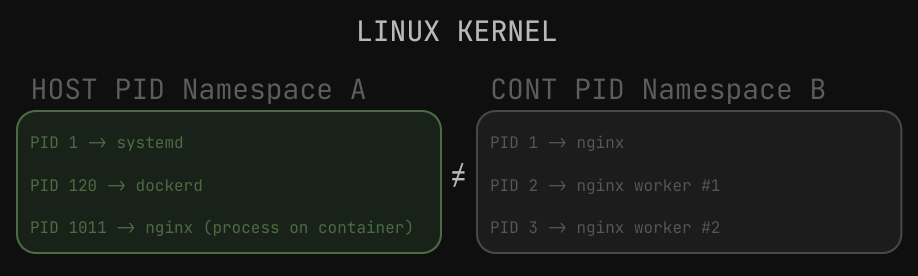
A simple illustration
PID 1 is not optional, it’s just a role enforced by the kernel and docker creates a new PID namespace for each container by default. Once you understand PID 1, half of docker weirdness stop being weird.
Well, I’m lazy to write all the technical jargon in one single post. In the next one, we’ll probably be looking into other important namespaces, networking, cgroups and stuff.
Comments
You can write to me at [email protected]. Email services are insecure, consider encrypting emails with my PGP Key if you're sending me something sensitive.
Loading comments