What's it like being a container? Part 2
How Linux namespaces give containers their isolated identity, from hostnames to filesystem mounts.
Published 3rd May, 2026
In Part 1, I covered how a container is just a Linux process and why PID 1 matters inside one. PID namespaces were the first piece of that illusion. But Docker doesn’t stop there, it uses six namespaces by default. Each one cuts off a different part of the host from the container’s view.
This one’s about those namespaces.
What’s actually there
Linux has seven namespaces in total: PID, UTS, IPC, Mount, Network, User, and cgroup. Docker uses all of them except User by default (user namespaces have to be explicitly enabled and come with some trade-offs we’ll get to).
You can see all of them for any running container through /proc:
$> ls -la /proc/$(docker inspect --format '{{.State.Pid}}' nginx)/ns/
lrwxrwxrwx 1 root root 0 cgroup -> cgroup:[4026531835]
lrwxrwxrwx 1 root root 0 ipc    -> ipc:[4026532578]
lrwxrwxrwx 1 root root 0 mnt    -> mnt:[4026532576]
lrwxrwxrwx 1 root root 0 net    -> net:[4026532581]
lrwxrwxrwx 1 root root 0 pid    -> pid:[4026532579]
lrwxrwxrwx 1 root root 0 uts    -> uts:[4026532577]
lrwxrwxrwx 1 root root 0 user   -> user:[4026531837]
Each of those symlinks points to a namespace inode. Two processes that share the same inode number are in the same namespace, they can see each other. Two processes with different inodes can’t. That’s the whole model.
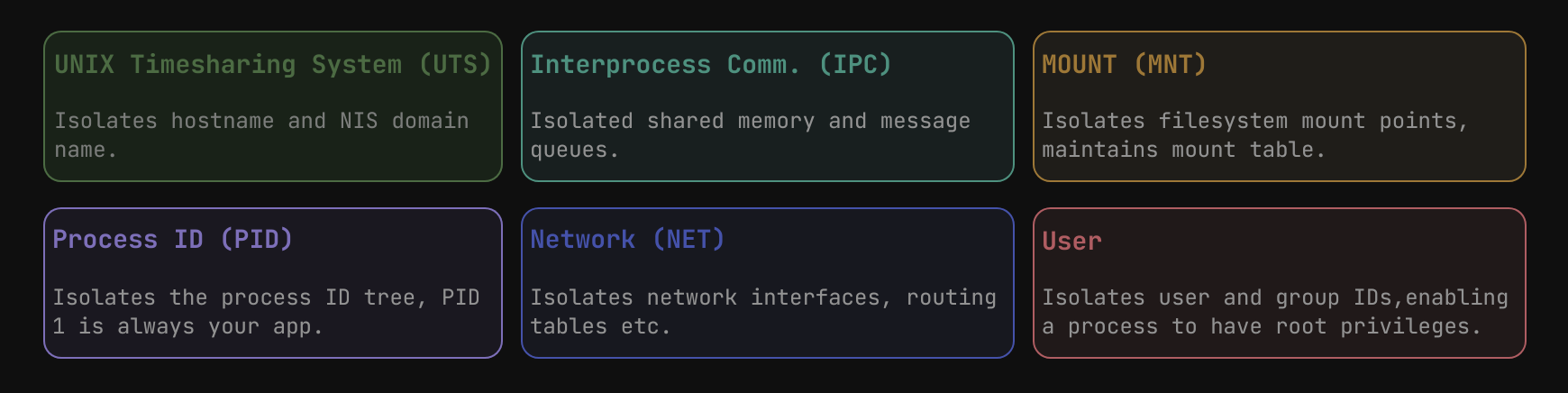
Each namespace wraps a different resource, a process lives inside all of them at once
UTS namespace
UTS stands for UNIX Time-sharing System. The name is ancient and gives nothing away, all it isolates is the hostname and NIS domain name.
This is why your container has its own hostname without affecting the host:
$> hostname
myserver

$> docker exec nginx hostname
a3f9c1d82b4e
Doesn’t sound like a big deal until you’re running a log shipper or a monitoring agent that uses the hostname to tag metrics. Without this, every container on the host would appear to be the same machine.
You can also set it yourself at runtime:
$> docker run --rm --hostname myapp alpine hostname
myapp
IPC namespace
IPC isolates inter-process communication resources, System V shared memory, semaphores, message queues, and POSIX message queues. Processes in different IPC namespaces simply cannot talk to each other through these mechanisms, even if they’re sitting on the same host.
For most containerized apps this never comes up. But if you’re running a database or an HPC workload that uses shared memory internally, the IPC namespace starts to matter. In those cases you’d want related processes to share a namespace:
$> docker run -d --name app1 alpine sleep 300
$> docker run --rm --ipc=container:app1 alpine ipcs
The --ipc=container:<name> flag puts the new container into the IPC namespace of an existing one. There’s also --ipc=host which shares the host’s IPC namespace directly, though I’d avoid that unless you have a specific reason.
Mount namespace
This is where things start getting more interesting. Every container gets its own mount table, the kernel shows it a completely different filesystem hierarchy from the host, even if the underlying storage is shared on disk.
$> cat /proc/mounts | grep overlay | head -1
overlay /var/lib/docker/overlay2/<hash>/merged overlay rw,...

$> docker exec nginx cat /proc/mounts | grep overlay
overlay / overlay rw,...
From the container’s perspective, that overlay mount is just /. It has no idea what the host’s filesystem looks like. This is what lets you run a Debian container on an Arch host, the kernel is the same, the userspace is whatever’s bundled in the image.
The mount namespace is also what makes bind mounts work:
$> docker run -v /host/path:/container/path nginxDocker adds a bind mount into the container’s mount namespace. The container sees a regular directory, the host just has a reference to its own path. No copying, no syncing, same data, two different views.
User namespace
User namespaces are the most impactful one and also the most nuanced. They remap user and group IDs between the container and the host.
In practice: root inside the container (UID 0) maps to an unprivileged user on the host. This is what rootless containers are built on.
$> docker run --rm alpine id
uid=0(root) gid=0(root) groups=0(root)
Looks like root. But if user namespaces are enabled, the kernel knows that UID 0 inside this namespace maps to something like UID 100000 on the host. Even if a process escapes the container, it lands as an unprivileged user.
You can see the mapping directly:
$> cat /proc/<container-pid>/uid_map
0  100000  65536
That reads: UID 0 inside the namespace maps to UID 100000 on the host, and 65536 UIDs are mapped from there.
Without user namespaces, root in the container is literally root on the host, same privileges, no remapping. That’s a real problem if anything ever escapes the container boundary, which has happened. User namespaces aren’t enabled by default in Docker’s standard configuration because they introduce some friction: volume permissions behave differently, some capabilities don’t translate cleanly, and a handful of system calls change behavior. But for anything running on shared infrastructure or anything externally exposed, they’re worth enabling.
Namespaces are composable
One thing worth knowing, Docker uses a fixed default combination of namespaces, but you can change any of them at runtime. --pid=host drops the container into the host’s PID namespace, so it can see every process on the machine. --network=host does the same for networking. You can also share namespaces between containers, which is exactly how Kubernetes pods work:
$> docker run -d --name pod-net --network=none alpine sleep 3600
$> docker run -d --network=container:pod-net alpine sleep 3600
Both containers now share the same network namespace, one IP, one set of interfaces, two separate processes. They can talk to each other on localhost with no extra configuration, same as processes on the same machine.
Next part covers cgroups, how container networking actually wires up with veth pairs and iptables, and the OverlayFS layering that makes image sharing efficient.
Comments
You can write to me at [email protected]. Email services are insecure, consider encrypting emails with my PGP Key if you're sending me something sensitive.
Loading comments